
Data integration services connect the systems your organisation already runs, such as finance, CRM, operations and reporting. They move, clean and combine data so people work from one consistent picture instead of retyping figures between tools. The best results come when the business problem is defined before any technology is chosen. This guide explains what you get from these services and where consulting fits. It also covers what to assess before you start and how to judge a provider.
TL;DR
- Data integration services collect data from source systems, transform it and deliver it to a target such as a warehouse, a dashboard or another application.
- Data integration (unifying data for analysis) and systems integration (making systems act on each other) overlap, but they need different skills. Consulting adds strategy, governance and handover to the technical build.
- Most failed projects start with unclear ownership, poor data quality and undocumented manual steps. Assess these first.
- Pick a provider on scope clarity, handover and fit with your process, not on tool names.
- We help NZ organisations define the process and the outcome, then deliver the digital workflow and integration work. See our digital solutions.
Table of Contents
- What data integration services actually include
- How data moves between your systems
- Data integration, systems integration and consulting: the differences
- Benefits and challenges for New Zealand organisations
- What to assess before you start
- Our perspective on integration
- How to choose a provider
- Where Klicx fits
- Build the skills to run it
- FAQ
- Sources
What data integration services actually include
The term covers a family of techniques, not one product. TDWI notes that ETL (extract, transform, load) is common, but data federation, database replication and data synchronisation are also part of the toolkit.
TDWI also separates two broad uses:
- Analytic integration feeds business intelligence and data warehouses.
- Operational integration sits outside reporting. It migrates or consolidates operational databases, keeps them synchronised, or exchanges data between businesses.
In practice, a service engagement for a New Zealand organisation usually bundles some of these pieces:
- Discovery and assessment: mapping which systems hold which data, who owns them and how data currently flows.
- Design: choosing the pattern (batch, near real time, virtual view) and the target.
- Build: connectors, transformations, validation rules and error handling.
- Testing and deployment: reconciling figures against the source before anyone relies on them.
- Support and handover: monitoring, documentation and training so your team can run it.
The last item is the one organisations forget to ask about. We come back to it below.
How data moves between your systems
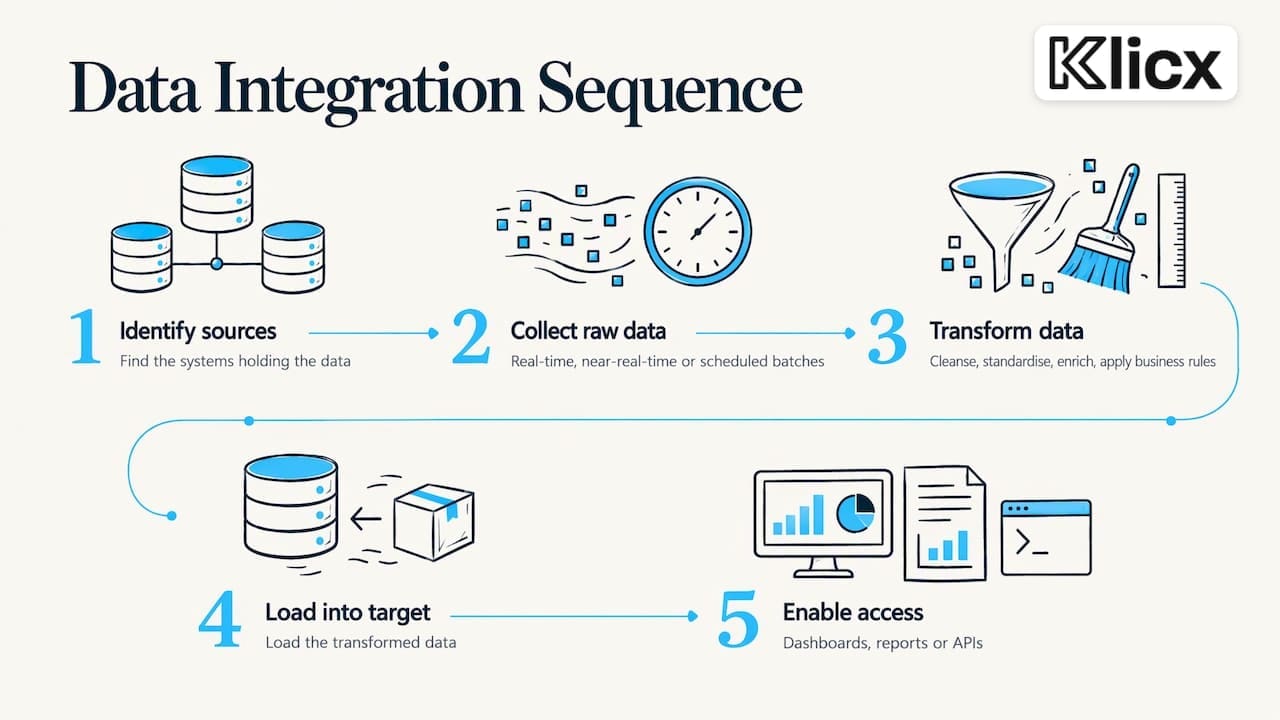
A typical integration follows a sequence of steps that Snowflake describes as identifying sources, collecting raw data (in real time, near real time or in scheduled batches), transforming it, loading it into a target and enabling access through dashboards, reports or APIs. Transformation covers cleansing, standardising, enriching and applying business rules.
ETL, ELT and virtual views
SAP explains that traditional approaches transform data before loading it (ETL), while newer approaches increasingly load raw data first and transform it in the target environment (ELT). There is a third route. AWS describes data virtualisation as a unified view that pulls from several sources when queried, without copying data between databases.
The right choice depends on the question you are answering:
| Need | Pattern that usually fits | Why |
|---|---|---|
| Monthly board reporting across finance, HR and sales | Warehouse with scheduled batch loads | Figures only need to be right at a point in time |
| A sale in one system must trigger an invoice in another | Event-based or API integration | Teams should not re-enter data |
| A quick combined view without moving data | Virtual view | Fast to stand up, depends on source performance |
| Moving off a legacy system | Migration plus synchronisation during cutover | Both systems run side by side for a while |
APIs, files and middleware
Not every system has a modern interface. iStart’s overview lists APIs, webhooks and push/pull syncs alongside older techniques such as batch CSV files, SFTP transfer and polling file folders. It adds that middleware can handle these consistently, and that it lets you swap one system out without disturbing the other. Many NZ organisations run a mix of modern cloud tools and older line-of-business software, so a realistic integration plan expects both.
A good build also handles the unglamorous parts: validating required fields and duplicates, alerting on failures and replaying corrected records safely. If a proposal does not mention error handling, ask how failures will be found and fixed.
Data integration, systems integration and consulting: the differences
The three queries people type, data integration services, data integration consulting and data systems integration, describe overlapping work. The practical distinctions are these.
Data integration moves data between systems into a unified, queryable layer, typically a warehouse. Systems integration connects systems so they act on each other, for example a CRM sale creating an ERP invoice. Cabin Co draws this line and notes that the skills and tools differ, even though the two overlap.
Consulting is the advisory layer on top. Serdao says integration consulting goes beyond connecting software to include strategic planning, architecture design, technology selection, risk assessment and performance optimisation.
A useful way to decide what you need:
- You know exactly what to connect and just need it built: a build-focused service is enough.
- You are unsure which systems, data or processes matter most: start with consulting and assessment.
- The integration will change how people work: you need both, plus training and change support.
The third case is more common than it looks. Connecting two systems around a broken process makes the broken process faster. That is why we treat integration as part of process improvement, not a separate IT task.
Benefits and challenges for New Zealand organisations
What you gain
Disconnected systems make it hard to get a full picture for decisions and add security complexity. They also create manual work that raises cost and time, as Fusion5 lists. Integration addresses these by making information locked in individual applications available for timely decisions.
In the public sector, Stats NZ’s assessment of its Integrated Data Service points to more granular analysis, wider reuse of data, cross-sector collaboration and longitudinal analysis as benefits. A business is not a government statistics agency, but the logic carries over: once data is combined, you can answer questions no single system could.
Common business gains include:
- fewer re-keying errors and less reconciliation of mismatched records
- one agreed number for each measure, such as revenue, cycle time or backlog
- faster onboarding of new systems, because connection patterns already exist
- reporting that no longer depends on one person’s spreadsheet
What gets in the way
The same Stats NZ document is candid about risks, including long-term retention of data and the handling of identifiable information. For any organisation, personal information in integrated data brings privacy obligations. Plan access controls and retention up front, and take advice from your privacy officer or a lawyer on your obligations under the Privacy Act 2020.
The technical obstacles are consistent across sectors. A NZ example is Vector’s Project PRISMED report. It names three barriers:
- access to data that had to be negotiated and lacked ongoing near real-time transfer
- no established standards for what data is captured
- different formats and structures between data providers
Swap the names and you have the story of most mid-sized integration projects: access, availability and format.
What to assess before you start
Skipping this step is the most expensive mistake. Xcelerate-tech’s readiness guide recommends assessing data quality across completeness, consistency, duplication and recency, because stale data integrated at scale produces stale outputs and duplicates compound with every sync. It also advises documenting data flows, system ownership, manual handoffs, and API availability and maturity.
Use this checklist in a workshop with the people who run the systems:
- Outcome: which decision or process will be better, and how will you measure it?
- Sources: which systems hold the data, and who owns each one?
- Quality: how complete, consistent and current is the data? Where do duplicates arise?
- Manual handoffs: which spreadsheets and email steps sit between systems today?
- Interfaces: does each system offer an API, file export or neither?
- Growth: will volumes, users and systems grow over the next few years?
- Security and compliance: who may see what, and what must be retained or deleted?
- Ownership after go-live: who monitors it, fixes it and changes it?
TDWI also advises giving a solution an explicit architecture, often hub-and-spoke, to support development standards, reuse of integration objects and maintainability. Ask any provider to show you the architecture, not only a list of connectors.
A worked example
Imagine a 150-person NZ distributor. Orders come in through a web shop, are keyed into an inventory system and then re-keyed into the finance system. Reporting is a monthly spreadsheet that takes two days to assemble.
A tool-first approach connects all three systems and builds a dashboard. A process-first approach asks why orders are keyed twice, which fields staff correct by hand and which three measures management actually uses. It finds that product codes differ between systems, so one mapping table fixes most mismatches. The integration then does less, costs less and is trusted more. This is an illustration, not a client case, but it shows why the assessment comes first.
Our perspective on integration
We rarely meet an organisation whose real problem is “we need a connector”. The problem is usually that nobody agrees how the work should flow, so every system holds a slightly different version of the truth. Connecting those systems without settling the process gives you the same confusion, only faster.
That is why we approach integration as part of business improvement. We use the EFQM framework to assess where the organisation stands, and we build the capability of your people with training such as Lean Six Sigma so improvements last after we leave. Then our digital solutions work puts the agreed workflow into your systems.
Our aim is that you are never dependent on us to understand your own data flows. Documented processes, trained staff and a clear owner for each system are as much a part of a good integration as the code.
Jeremy
How to choose a provider
Providers come in several types. Software platform vendors sell tools, specialist integration firms build and run connections, large IT services companies handle enterprise programmes, and improvement consultancies start from the process. None is right for every job. Judge them on these criteria:
| Criterion | What good looks like |
|---|---|
| Discovery | A structured assessment of current systems and data flows before any quote |
| Scope | Clear deliverables: working pipelines, governance, documentation and a handover |
| Process thinking | Questions about how work happens, not only which tools you own |
| Data location and privacy | Clear answers on where data is held and how personal information is protected |
| Error handling | Monitoring, alerts and a plan for failed or corrected records |
| Capability transfer | Training so your staff can run and adjust it |
| Exit | A maintenance handoff that does not need a retainer forever |
The last two matter more than most buyers realise. Cabin Co says a good engagement ends with a handoff your team can maintain without keeping the consultancy on retainer indefinitely. Fusion5 cautions that “drag and drop” promises can understate the complexity and technical skill needed for reliable integrations. Whichever route you take, budget for expertise as well as licences.
Also ask how the provider will measure success. “Data is flowing” is an activity. “Month-end close takes three days, not six” is an outcome.
Where Klicx fits
We are a New Zealand consultancy that combines assessment, capability building and implementation support. For integration, that means:
- Assessment: our business assessment shows where strategy, process and systems are misaligned before anything is built.
- Process design: business improvement work clarifies the workflow the integration must support.
- Digital delivery: our digital solutions cover workflow and systems integration. Our guide to digital workflow solutions is a practical next read.
- Project support: innovation and project management support keeps delivery on track.
We do not publish prices for consulting or digital projects, because scope drives cost. We discuss it once we understand your systems and your goal.
Build the skills to run it
Integration works best when the people who use the data understand process improvement. Our courses are priced per person and published on our site:
- Lean White Belt Optimisation Foundation: from $795
- Lean for Leaders, Sponsors and Champions: from $495
- Lean Six Sigma Yellow Belt: from $1,500
- Lean Six Sigma Green Belt: from $3,345
All prices are in NZD. Sponsors and champions who attend Lean for Leaders can back an integration project with a shared language for waste, variation and flow.

If you are scoping an integration and want a clear view of your processes first, talk to us about a business assessment or see all our courses.
FAQ
What is the difference between data integration consulting and data systems integration?
Data systems integration is mainly technical execution: connecting systems and moving data. Consulting adds advisory work such as strategy, architecture, governance and risk, along with oversight of delivery. If you are unsure what to connect or why, start with consulting.
How long does a data integration project take?
It depends on the number of systems, data quality and available interfaces, so we do not quote a standard timeline. A clear assessment of data flows and ownership at the start is the best way to get a reliable estimate. Ask any provider to break the project into discovery, build, testing and handover.
Do I need a data warehouse?
Not always. A warehouse suits combined reporting and analysis. Event-based integration suits cases where one system must trigger action in another, and a virtual view can give a combined picture without copying data. The decision should follow the question you need to answer.
What should I prepare before speaking to a provider?
List your systems and who owns them, the manual handoffs between them and the decisions you want to improve. Note any personal information involved, because privacy and access rules shape the design. Even a rough one-page map speeds up scoping.
Sources
- Data Integration in a Nutshell: Four Essential Guidelines, TDWI
- What Is Data Integration? Process, Benefits and Examples, Snowflake
- Data Integration: What It Is, How It Works, Types, SAP
- What is Data Integration?, AWS
- Consulting and Integration Services, iStart
- Data Integration Consulting: Cost, Timeline, Red Flags, Cabin Co
- What is a system integration consulting service?, Serdao
- A Comprehensive Guide to Enterprise Integration, Fusion5
- iPaaS vs Integration as a Service, Fusion5
- Privacy impact assessment for the Integrated Data Service, Stats NZ
- Project PRISMED final report, Vector
- Integration Readiness Guide, Xcelerate-tech
Recommended
- Digital Workflow Solutions: A Practical Guide for NZ Organisations
- Digital Solutions
- Business Assessment & Improvement Roadmap NZ
This article was produced with AI assistance and reviewed for accuracy. It is provided for general information only and is not professional advice.